Standalone Activity
What is a Standalone Activity?
A Standalone Activity is a top-level Activity Execution started directly by a Client, without using a Workflow.
Standalone Activities are Temporal's job queue - the simplest way to run durable, retryable background jobs on Temporal. A job is queued, dispatched to one of your Workers, retried on failure, and kept addressable the whole time.
Use it to run a single Activity reliably - sending an email, processing a webhook, syncing data, transcoding a file. If you need to orchestrate multiple steps that depend on each other, use a Workflow instead. Standalone Activities don't replace Workflows, and you can use both in the same application.
Coming from another job queue?
Temporal uses its own names for some job queue concepts, here's how they map:
| In a job queue | In Temporal |
|---|---|
| The function a job runs | An Activity Definition - a normal function, registered by name |
| One enqueued job | A Standalone Activity Execution - one durable run, addressable by its Activity Id |
| The queue | A Task Queue that your Workers poll |
| A worker process | An Activity Worker - your process, running your code |
For the full comparison and a migration path, see Job Queue and Migrate a Celery task queue to a Standalone Activity.
Key features
Durable job lifecycle
Each job is durably persisted before any Worker sees it, so jobs aren't lost. Workers pull work from a Task Queue and there's no head-of-line blocking, so a slow job doesn't block the dispatch of other Tasks. See Activity Execution Lifecycle.
Retries and timeouts
Every job carries a Retry Policy and timeouts you set when you start it. The default is at-least-once: retry with exponential backoff until the job succeeds or its Schedule-To-Close Timeout elapses. Set Maximum Attempts to 1 for at-most-once.
Because a retry runs your function again, Activity code should be idempotent.
Long-running jobs and Heartbeats
Jobs can run for any duration. Heartbeat to signal liveness and to checkpoint progress.
A retry restarts your Activity function from the top - it doesn't resume mid-function. The last recorded Heartbeat details are made available to the next attempt, so your code can read the checkpoint and skip the work it already finished.
Deduplicate with the Activity Id
Use a business identifier you already have as the Activity Id, and Temporal enforces uniqueness for you: an Activity Id Conflict Policy covers a job that's already running, and an Activity Id Reuse Policy covers one that already completed.
This is a different problem from idempotency, and you need both. The Activity Id stops you submitting the same job twice. Idempotent code stops one job's side effects happening twice if retried.
Priority and fairness
Priority is strict: higher-priority Tasks dispatch before lower-priority ones. Fairness prevents starvation: each fairness key gets its own virtual queue and dispatch cycles round-robin across keys, so one tenant's backlog doesn't starve everyone else.
On Temporal Cloud, enabling Fairness carries a per-Action surcharge.
Schedule a job for later
Start Delay dispatches the first Activity Task after a delay instead of immediately. Use it for work that shouldn't run until later, such as a reminder email or a deferred cleanup step.
temporal activity start \
  --activity-id my-activity \
  --type MyActivity \
  --task-queue my-task-queue \
  --start-to-close-timeout 5m \
  --start-delay 1h
The delay applies to the first Activity Task only. Retry attempts are dispatched according to the Retry Policy, not the delay.
Start Delay schedules one job at a future time. It doesn't create a recurring schedule.
Visibility
Query jobs with List Filter by type, status, Task Queue, and other attributes, from the SDK or with
temporal activity list. See Search Attributes for the attributes set on Standalone Activity
Executions, and add your own to filter on your business data.
temporal activity list shows a list of jobs optionally matching a List Filter.
./temporal activity list --query "ExecutionStatus='Running'"
  Status          ActivityId             Type       StartTime
  Running  process_files-1786633958  process_files  1 week ago
temporal activity count returns the total number of Standalone Activity Executions optionally matching a List Filters, analogous to counting Workflow Executions.
./temporal activity count --query "GROUP BY ExecutionStatus"
Total: 45
Group total: 30, values: Completed
Group total: 10, values: Canceled
Group total: 4, values: Terminated
Group total: 1, values: Running
This is the count of Activity Executions (Completed, Running, Failed, etc.) - not the number of queued tasks.
temporal activity describe shows one job's status, attempt count, and last error.
./temporal activity describe -a process_files-1786633958
Activity Execution Info:
  ActivityId            process_files-1786633958
  RunId                 01a06322-99ac-7972-8829-65352fc5d158
  Type                  process_files
  Status                Running
  RunState              Scheduled
  TaskQueue             demo-task-queue
  StartToCloseTimeout   24h0m0s
  Attempt               1
  ScheduleTime          1 week ago
  StateTransitionCount  3
Observability
All existing Activity metrics apply to Standalone Activities. This includes counts for scheduled, started, completed, failed, timed out, and canceled activities.
Lifecycle control
Because a Standalone Activity has no Workflow to own it, you act on the execution directly by Activity Id:
- Request Cancel asks the execution to close gracefully, letting your code clean up. See Cancellation.
- Terminate forcefully closes the execution, with no opportunity for your code to clean up.
- Delete terminates the execution if it's running, then deletes it asynchronously.
Activities must Heartbeat to receive Cancellation, so interrupting an already-running attempt is cooperative: Temporal can accept a Cancel request without the Worker honoring it. If the Worker is unresponsive, the request takes effect at the next attempt boundary, for example when the Start-To-Close Timeout elapses.
Only Terminate and Delete discard Activity progress unconditionally.
Operator commands
Pause, Unpause, Reset, and Update Options let an operator intervene in a running job from the CLI, the UI, or the gRPC API.
These commands are in Public Preview. Request Cancel, Terminate, and Delete are Generally Available.
See Activity Operations for behavior, precedence, and batch support.
Asynchronous completion
A Standalone Activity can return from its function without completing the Activity Execution, leaving an external system to Heartbeat progress and deliver the final result by Activity Id or Task Token. See Asynchronous Activity Completion.
Reuse Activities for jobs and Workflows
You define the Activity and register it on an Activity Worker once. The same function runs as a Standalone Activity or as a step in a Workflow, with no changes to your Activity code or your Worker. Start with background jobs, and add Workflow orchestration later without a rewrite.
Activity options
You set Activity Options on the Client when you start the job. At minimum, specify a timeout - typically the Start-To-Close Timeout.
| Option | What it controls |
|---|---|
| Timeouts | Schedule-To-Start, Start-To-Close, Schedule-To-Close, and Heartbeat |
| Retry Policy | Retry backoff and Maximum Attempts. Set Maximum Attempts to 1 for at-most-once |
| Task Queue | Which Workers get the job |
| Activity Id | The deduplication key, with its Conflict and Reuse policies |
| Priority and fairness | Dispatch order when jobs compete for the same Workers |
| Start Delay | Run the job after a start delay |
Activity Id and deduplication
Standalone Activities have a separate Id space from the Workflow Id space and other Temporal primitives, so the Activity Id Conflict Policy and the Activity Id Reuse Policy observe only the Standalone Activity Id space for deduplication and uniqueness.
What is an Activity Id Reuse Policy?
An Activity Id Reuse Policy determines whether a Standalone Activity Execution can start with an
Activity Id that a previous, and now closed, Standalone Activity Execution used. If the request is denied, the Temporal
Service returns an ActivityExecutionAlreadyStarted error.
See Activity Id Conflict Policy for resolving a conflict with a running Standalone Activity Execution.
The Activity Id Reuse Policy can have one of the following values:
- Allow Duplicate: The Standalone Activity Execution can start regardless of the closed status of a previous Standalone Activity Execution with the same Activity Id. This is the default policy, if one isn't specified.
- Allow Duplicate Failed Only: The Standalone Activity Execution can start only if the previous Standalone Activity Execution with the same Activity Id failed, was canceled, was terminated, or timed out.
- Reject Duplicate: The Standalone Activity Execution can't start if a previous Standalone Activity Execution has the same Activity Id, regardless of its closed status.
These values apply to closed Standalone Activity Executions that are still retained in the Namespace, so the check reaches back only as far as the retention period.
What is an Activity Id Conflict Policy?
An Activity Id Conflict Policy determines what happens when you start a Standalone Activity with an Activity Id that a running Standalone Activity Execution already uses. Two Standalone Activity Executions never run at the same time with the same Activity Id.
See Activity Id Reuse Policy for reusing the Activity Id of a closed Standalone Activity Execution.
The Activity Id Conflict Policy can have one of the following values:
- Fail: Doesn't start a new Standalone Activity Execution and returns an
ActivityExecutionAlreadyStartederror. This is the default policy, if one isn't specified. - Use Existing: Doesn't start a new Standalone Activity Execution and returns a handle to the running one.
Result retention
A Standalone Activity Execution and its result are retained for the
Retention Period of the Namespace it ran in, the same as other
closed Executions. Within that window the Execution stays visible to temporal activity describe and
temporal activity list. After the Retention Period elapses, the Execution and its result are deleted and the
Activity Id becomes available for reuse.
Retention is also what enforces deduplication: the Reuse Policy checks against the retained record of a completed job, so a job older than the Retention Period no longer blocks reuse of its Activity Id.
To remove an Execution before then, use temporal activity delete.
Worker configuration
An Activity Worker's default poller count is lower than the concurrency many job queue frameworks use, and some of them prefetch several tasks per poll. If you're moving existing work to Standalone Activities and comparing throughput, match the poller count to your previous system before you measure. Otherwise the comparison reflects poller configuration rather than the platform.
See Worker performance for poller autoscaling and the manual settings.
For long-running Activities, start the Activity and hold the handle rather than blocking on the result, so a Worker slot and poller aren't held for the duration.
Serverless Workers
Job queue load is bursty, so Activity Workers often sit idle between jobs. With Serverless Workers, Temporal starts the Worker instead: when a job arrives and no Worker is available to take it, Temporal invokes your configured compute provider, the Worker polls the Task Queue, processes the job, and scales back down.
Your Activity code and Worker registration are unchanged. The Worker must belong to a Worker Deployment Version with a compute provider configured, which is how Temporal knows what to invoke.
AWS Lambda support is in Public Preview and GCP Cloud Run is in Pre-release. See Deploy a Serverless Worker.
Standalone Activity versus Workflow Activity
A Standalone Activity follows the same execution semantics as an Activity in a Workflow: it's queued, retried until it succeeds or its Schedule-To-Close Timeout elapses, and it requires idempotent Activity code. What differs is that it's orchestrated by its own state machine, so there's no Workflow Event History and no deterministic replay.
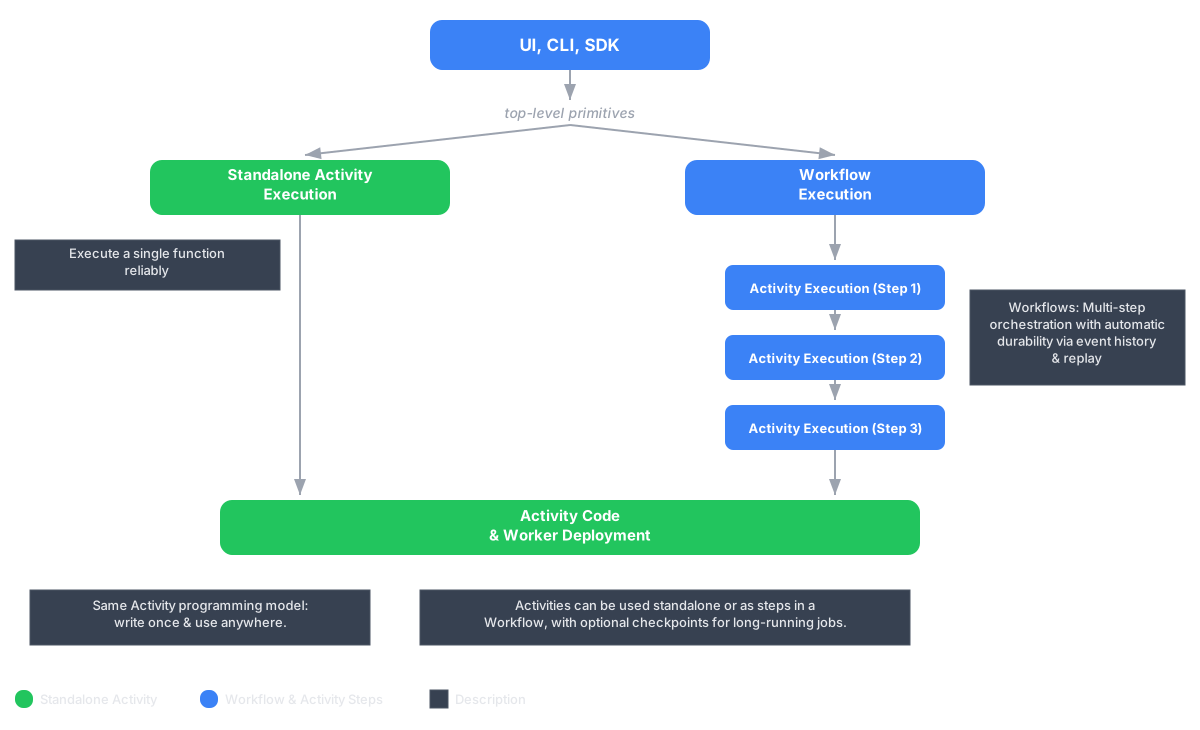
Both are durable Activity Executions that use the same Activity Execution lifecycle. The Activity Definition and Worker registration are identical, so the same Activity function can run either way with no code changes. What differs is who starts it and what owns its lifetime.
Running a single Activity as a Standalone Activity also costs fewer Billable Actions in Temporal Cloud than wrapping it in a Workflow, and short jobs see lower latency because there are fewer Worker round-trips. See cost optimization for details.
Feature release stages
Standalone Activities are Generally Available, including Start Delay, Request Cancel, Terminate, and Delete.
These capabilities are in Public Preview:
- Operator commands: Pause, Unpause, Reset, and Update Options.
- Batch operations by List Filter: Request Cancel, Terminate, and Delete.
Limitations
The following features are not yet supported:
TerminateExistingconflict policy. UseFailorUseExistinginstead.- Starting from a recurring Schedule. For a one-time job at a future time, use Start Delay. For recurring work, schedule a Workflow that invokes the Activity, which runs it as a Workflow Activity rather than a Standalone Activity.
- Starting from Temporal Nexus.
- Batch Reset, Pause, Unpause, Update Options, Complete, and Fail.
- Export for Standalone Activities similar to Workflow Export.
Temporal CLI support
Standalone Activities require Temporal CLI v1.9.0 or higher and Temporal Server v1.32.0 or higher.
Install with Homebrew:
brew install temporal
Or see the Temporal CLI install guide for other platforms.
Verify the installation:
temporal --version
Which should output v1.9.0 or higher, for example:
temporal version 1.9.0 (Server 1.32.0, UI 2.53.3)
The temporal activity subcommand supports Standalone Activities with start, execute, result, list, count,
describe, cancel, terminate, and delete. It also supports the Public Preview operator commands pause,
unpause, reset, and update-options. See Activity Operations.
Temporal Cloud support
Standalone Activities are Generally Available in Temporal Cloud, in all regions.
Service Level Objectives and the Service Level Agreement match those for Workflows. See Service availability and SLA.
- Try it end to end with the Standalone Activities demo.
- Build a job queue with priority and fairness: Go, Java, Python, TypeScript.
- Add orchestration when you need it: see Workflow Activity.